Today we're going to talk about selective or conditional structures (IF/ELSE - SWITCH/CASE), a tool that allows us to change the sequence of code based on a condition.

# The IF/ELSE Structure
In the previous article we took the first steps, creating sequential algorithms. In this one, I'm going to tell you about selective or conditional control structures that will allow us to change the sequence based on a condition.
The code is what decides which block or statements to execute, which path to follow.
Within the selective structures, we have the if - else structure; it is written as follows:
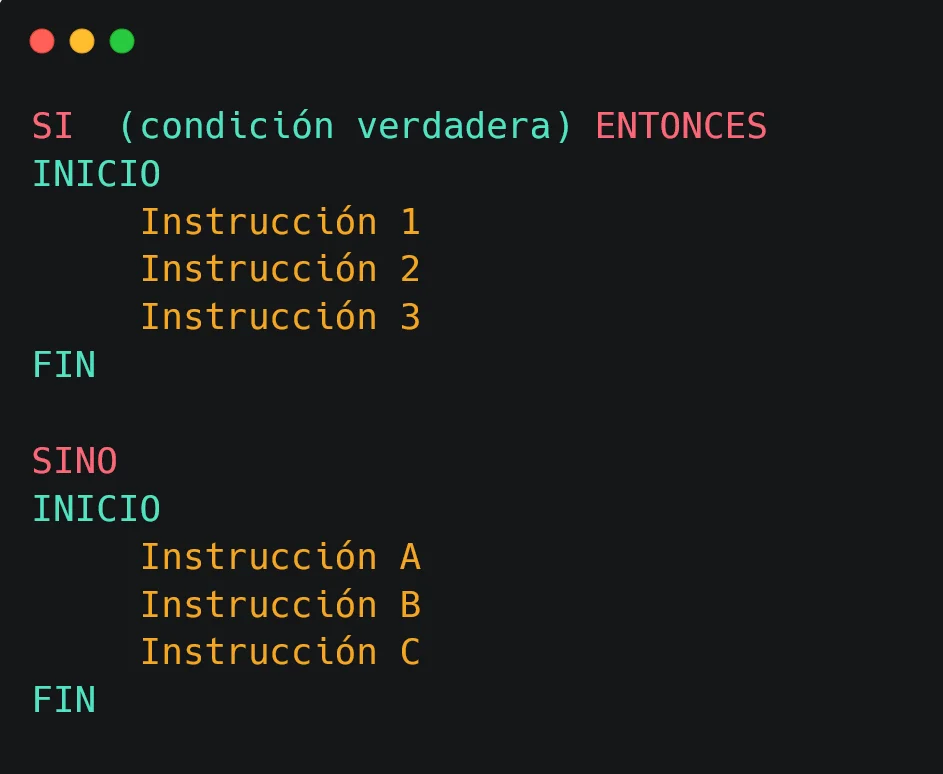
If the condition is true, it will execute instructions 1, 2, and 3. Otherwise (if the condition is not true), it goes through instructions A, B, and C.
Note that the blocks go within start/end statements, to know where each block begins and ends.
# Example
We have two numerical variables, A and B, both loaded with their respective values, and suppose we want to "determine if A is greater than B":
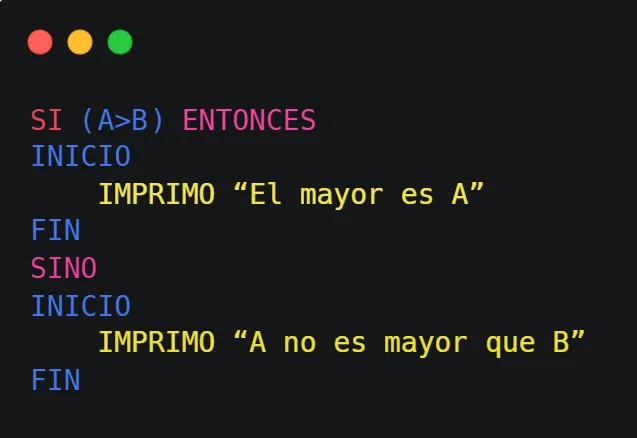
This can be read like this:
"If A is greater than B, then I print 'A is larger', otherwise I print 'A is not greater than B'"
When A is greater than B (for example A = 5 and B = 3, it will show "A is larger" on the screen).
When A is less than or equal to B (for example A = 5 and B = 5, it will show "A is not greater than B" on the screen).
# How are conditions built? Relational Operators
We'll set this apart, as conditions are used by selective structures, but they exist by themselves.
Conditions are built using relational or comparison operators.
These are symbols used to compare two values, and that generates an expression that has a truth value (true or false).
If the comparison result is correct (or true), the expression is true; otherwise, it is false.
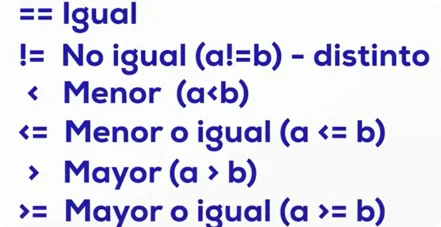
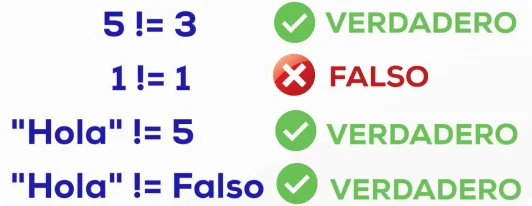
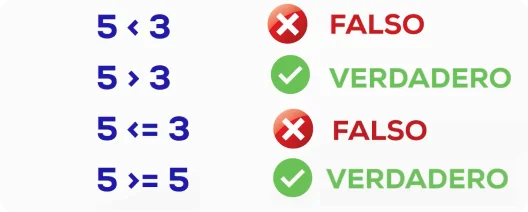
Let's see some examples taken from Python:
Equal
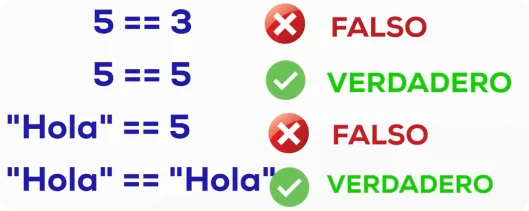
Different
Greater and Less than
# Nested "If" Selective Structures
If structures can also be nested.
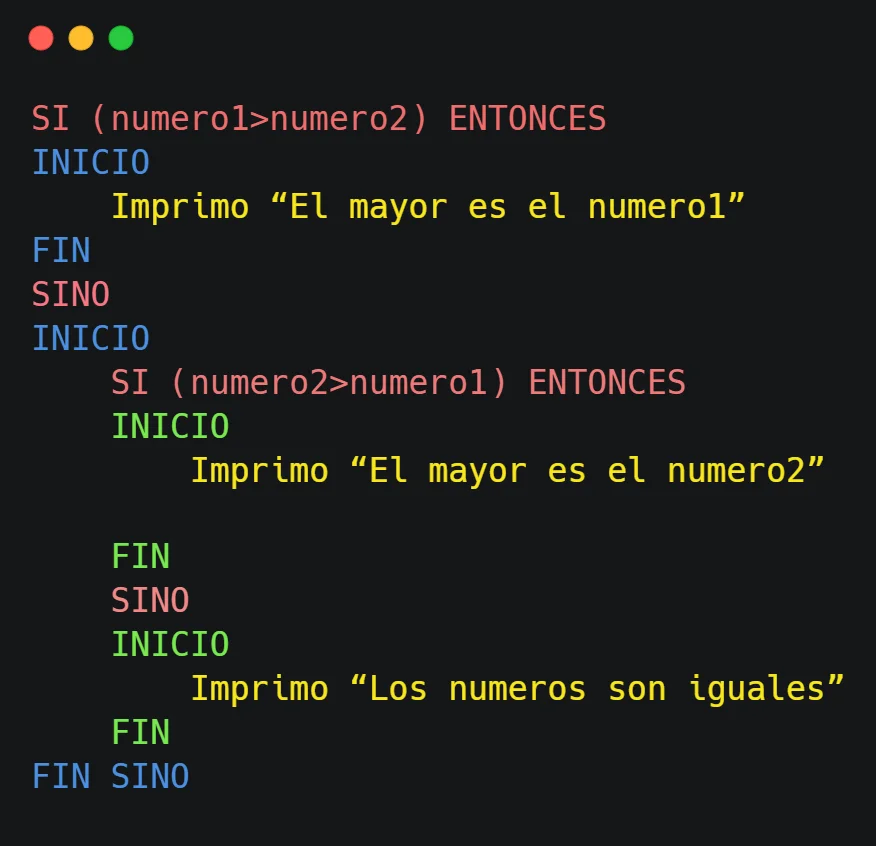
If the number1 variable is greater than the number2 variable, then I print "number 1 is larger"; else (I start another block) if number2 is greater than number1, then I print "number 2 is larger". Else (both are equal), then I print "the numbers are equal".
# Logical Connectors
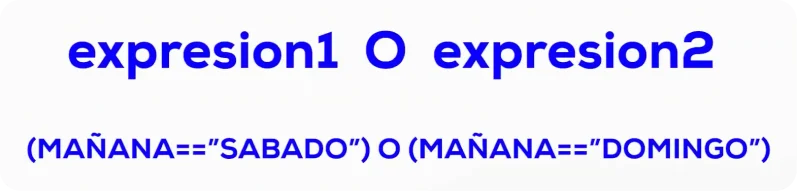
Expressions can be connected using logical operators: "AND" - "OR".
Each expression has its own truth value; when connecting two or more expressions, what are connected are those truth values.
expression1: 5 > 2 : true
expression2: 5 > 3 : true
If we have:
expression1 AND expression2 : true AND true : true
The connection of two expressions through the AND connector, each with a true value, returns the result true.
OR Example
AND Example
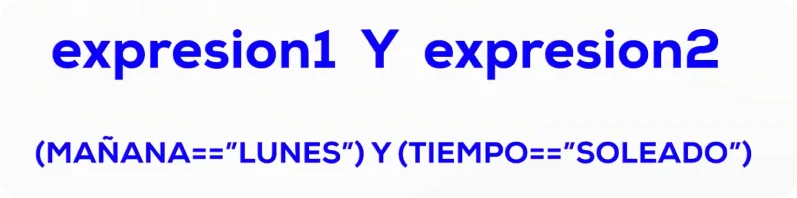
# Truth Tables
We saw that the values of an expression joined by connectors depend on the truth value of each expression.
There are tables where we can see the values for the AND and OR connectors; in this case, we have the expressions "A AND B" and "A OR B":
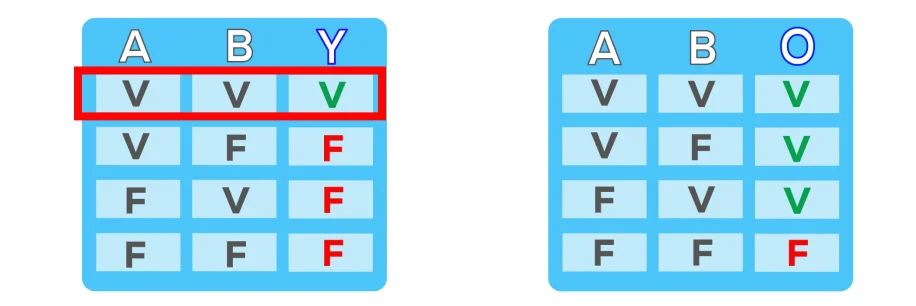
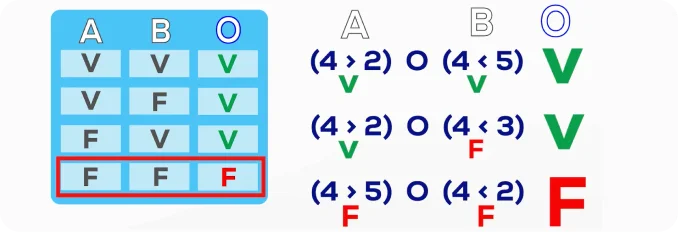
A OR B (For the OR connector): if A and B are false, the OR is false. in all other cases, it is true, for example:
- 4 greater than 2 or 4 less than 5; the total expression is true
- 4 greater than 2 or 4 less than 3; it is true because one of the two is true
- 4 greater than 5 or 4 less than 2; it is false because both are false
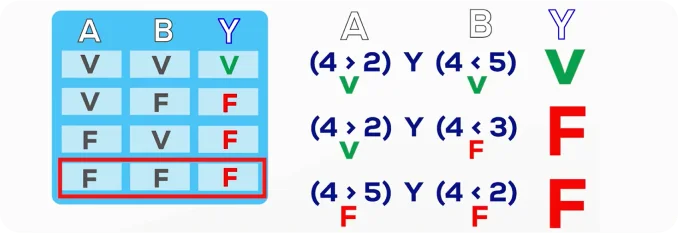
A AND B (For the AND connector): if A and B are true, the complete expression is true. in any other case, it is false, for example:
- 4 greater than 2 and 4 less than 5; the total expression is true
- 4 greater than 2 and 4 less than 3 is false; because one of the two is false
- 4 greater than 5 and 4 less than 2 is false; because both are false
# Negation Operator
We also have the negation operator, "NOT A", which "denies A", inverting the truth value of expression A:

If A is true, the result of "NOT A" is false. if A is false, the result of "NOT A" is true.
The if structure responds to the truth value of the expression it is evaluating.
# Practical Application Example
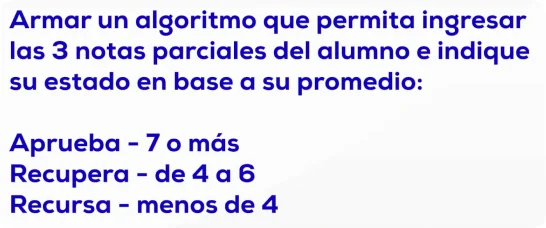
Let's analyze the problem, we have:
- grades
- average
- and student status (pass/recurse)
The problem asks us to say if the student passed, if they retake, or if they recurse.
We are going to determine this with the student's average, with the three grades entered.
These three grades are variables and will be of decimal type, so first we will have to:
- 01. read those three grades of the student
- 02. calculate the average and based on the result, we decide which text to show
- 03. we can use one more decimal variable to store the average
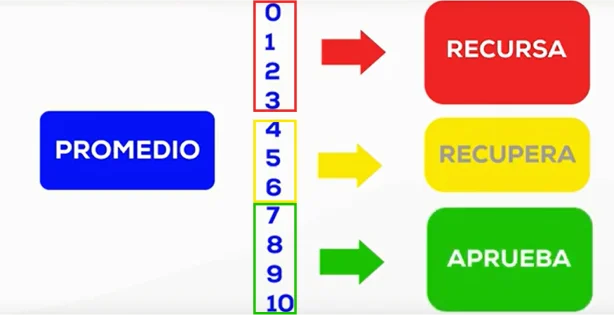
If the average is between 0 and 3, the student recurses. if the average is between 4 and 6, the student retakes. and if the average is between 7 and 10, the student passes the subject.
With this, we set the conditions for the average:
- If average < 4, recurses
- if average >= 4 and < 7, retakes
- if average >= 7, passes
# The Algorithm
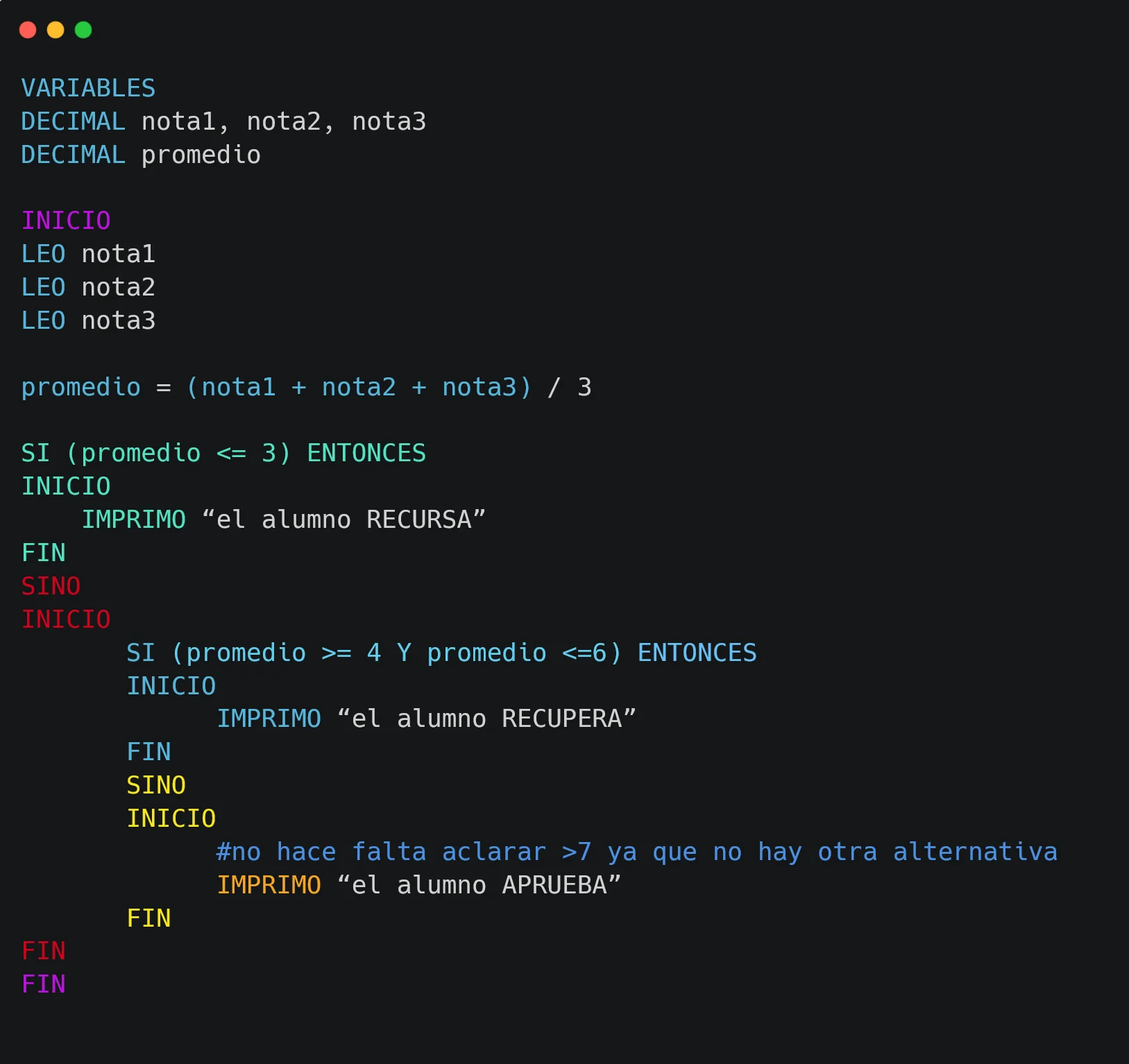
We define variables of decimal type: grade1, grade2, and grade3. I also create the average variable to store the result.
We print a message asking to "Enter grade1" and read grade1 (we load the value the user enters into the grade1 variable). we do the same with the other variables grade2 and grade3.
We calculate the average by adding the grades and dividing them by three, and assigning that to the average variable.
Here the interesting part begins: the condition blocks: if the value of the average variable is less than or equal to 3, we print the student "recurses", else, we open a new block, where there are two possibilities; if the average is greater than or equal to 4 and less than or equal to 6, we print the student "retakes", and else, there is only one alternative left (average is greater than or equal to 7, there is no other mathematical possibility), we print the student "passes".
# Improving the Algorithm
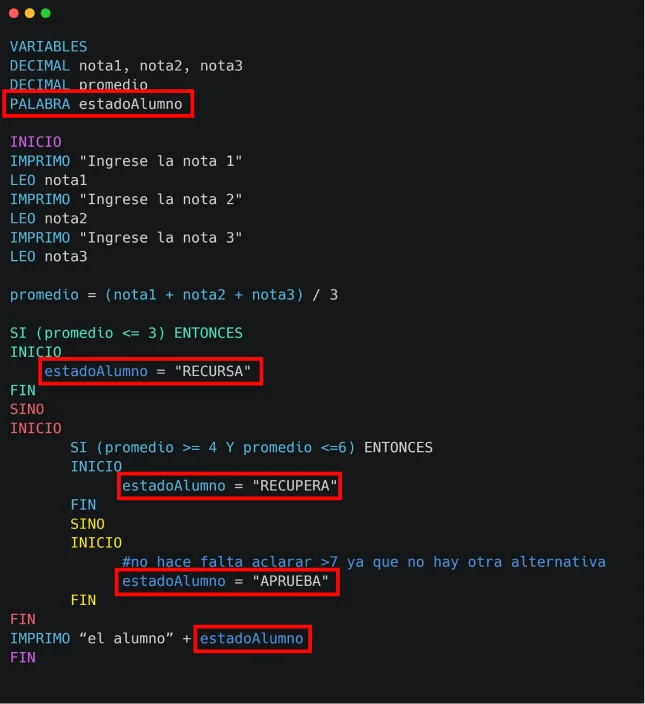
Using a string variable studentStatus, instead of using the print primitive in every part of the code, we assign the status value to that variable according to the block entered, and after the conditional part, we print "the student" plus the studentStatus variable.
With this, our algorithm becomes more readable.
# SWITCH/CASE
Another tool we have is the Switch/Case structure.
It works in the same way as the if structure but is written differently:
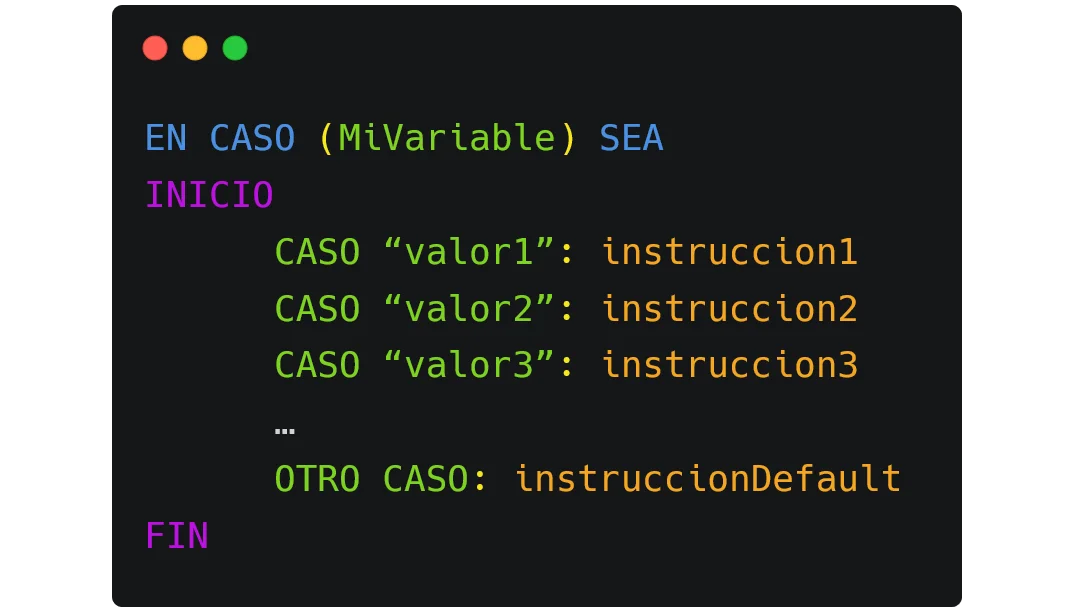
In case the value of MyVariable is "value1", instruction1 is executed; if it has value "value2", it executes instruction2 and so on for all indicated cases.
The last option, "Default case", serves for any other value; if none of the previous values are met, it enters here and executes defaultInstruction.
It's similar to "if", but sometimes it's easier to write it this way; it can be more readable depending on the case.
It's usually very useful when we have few and very specific alternatives.
# Switch/Case Example
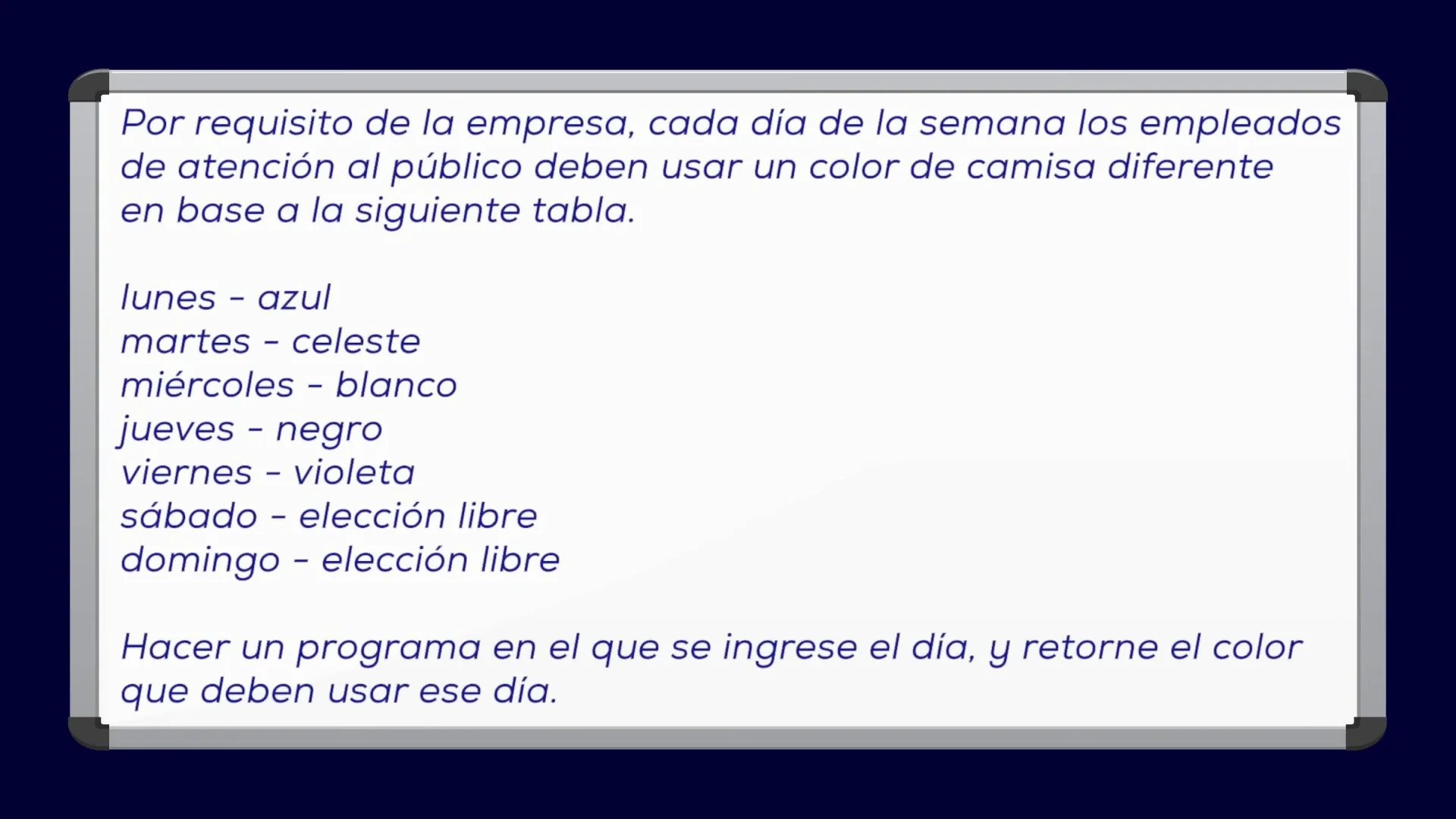
The exercise asks to enter a day of the week.
Sometimes you have to make assumptions; as it doesn't clarify, we can assume the day will be entered as text, and in lowercase, like for example:
monday, tuesday, wednesday
"MONDAY" (in uppercase) is not the same as "monday" (in lowercase).
Even "Monday" is also different from "monday".
If we wanted them to be considered the same, we would have to use a primitive or a function to transform them, from uppercase to lowercase.
We are going to use the weekDay variable to load the day's value, and since it will be text, it must be of type string.
The color will be a text: "blue, sky blue, white"; we can use a variable to store the result, we can call it color variable and it will also be of type string.
The condition will depend on the value of the weekDay variable, a different color per day; we can use both the if/else structure and the switch/case structure. In this case, the latter fits better; the algorithm will find it simpler to understand.
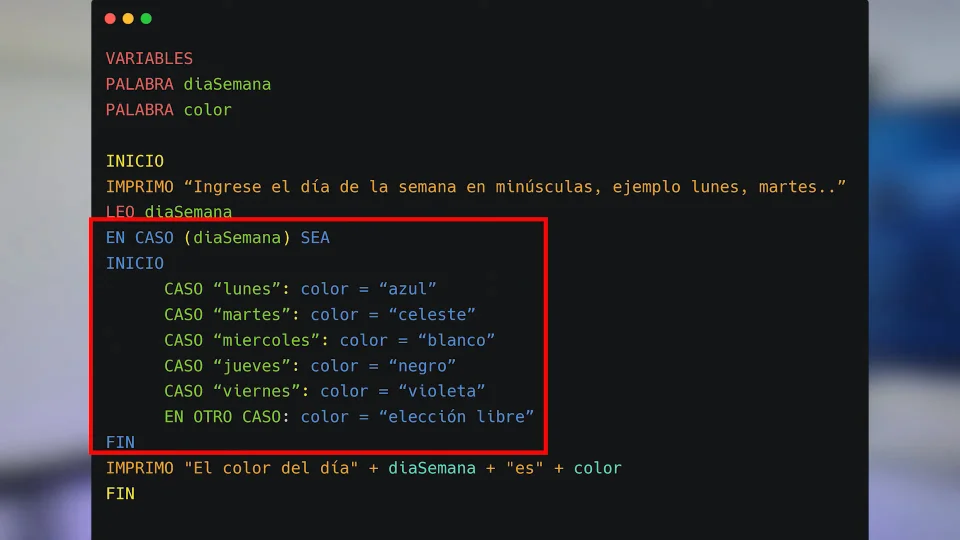
Could we have done it with the if structure? of course! there's almost always more than one alternative to do things. It's up to us to choose what we consider best.
Today we saw selective structures, with their two implementation variants (if/else - switch/case), which allows us to change the course of execution.
# Practice Exercises
But before, since the only way to learn is by practicing, here are some exercises for you to practice and apply what you've seen:
Write an algorithm that reads two numbers and shows the larger one.
VARIABLES
  INTEGER number1
  INTEGER number2
  INTEGER larger
START
  PRINT 'Enter the first number'
  READ number1
  PRINT 'Enter the second number'
  READ number2
  IF (number1 >= number2) THEN
    larger = number1
  ELSE
    larger = number2
  PRINT 'The larger value is: ' + larger
ENDBuild an algorithm to determine the winner of elections between 3 candidates.
VARIABLES
  INTEGER candidate1Votes, candidate2Votes, candidate3Votes
START
  READ candidate1Votes, candidate2Votes, candidate3Votes
  IF (candidate1Votes > candidate2Votes AND candidate1Votes > candidate3Votes) THEN
    PRINT "The winner is candidate 1"
  ELSE IF (candidate2Votes > candidate1Votes AND candidate2Votes > candidate3Votes) THEN
    PRINT "The winner is candidate 2"
  ELSE IF (candidate3Votes > candidate1Votes AND candidate3Votes > candidate2Votes) THEN
    PRINT "The winner is candidate 3"
  ELSE
    PRINT "Tie or review required"
ENDVARIABLES
INTEGER value1, value2, value3, largest, smallest
START
READ value1, value2, value3
IF (value1 >= value2 AND value1 >= value3) THEN largest = value1
ELSE IF (value2 >= value1 AND value2 >= value3) THEN largest = value2
ELSE largest = value3
// Same logic for smallest
PRINT "Largest: " + largest + " Smallest: " + smallest
ENDVARIABLES
INTEGER number
START
READ number
IF (number % 2 == 0) THEN
PRINT "It is even"
ELSE
PRINT "It is odd"
ENDVARIABLES
INTEGER number
STRING roman
START
READ number
SWITCH (number)
CASE 1: roman = "I"; CASE 2: roman = "II"; CASE 3: roman = "III"
CASE 4: roman = "IV"; CASE 5: roman = "V"; CASE 6: roman = "VI"
CASE 7: roman = "VII"; CASE 8: roman = "VIII"; CASE 9: roman = "IX"
CASE 10: roman = "X"
END_SWITCH
PRINT "In Roman it is: " + roman
ENDIn the next article, we will see the repetitive or cyclic structure, which allows us to repeat the execution of a block of instructions.
Resources used
- Image by tonodiaz on Freepik
- Image by brgfx on Freepik
- Image by rawpixel.com on Freepik
- Image from Freepik
- Image from Freepik
- Image from Freepik